
Webhooks
Webhooks
Receive real-time notifications about message delivery events by configuring webhook endpoints.
Overview
Webhooks let your application receive automatic HTTP POST callbacks whenever messaging events occur — a message is sent, delivered, fails, or a recipient replies. Instead of polling the API for status updates, you configure an endpoint URL and the platform pushes events to you as they happen.
How it works:
- Create a webhook via the Dashboard, specifying your endpoint URL and the event types you want to receive
- When a matching event occurs, the platform sends a
POSTrequest to your endpoint with the event payload - Your server processes the event and returns a
2xxresponse - If delivery fails, the platform retries with increasing backoff intervals
Creating a webhook
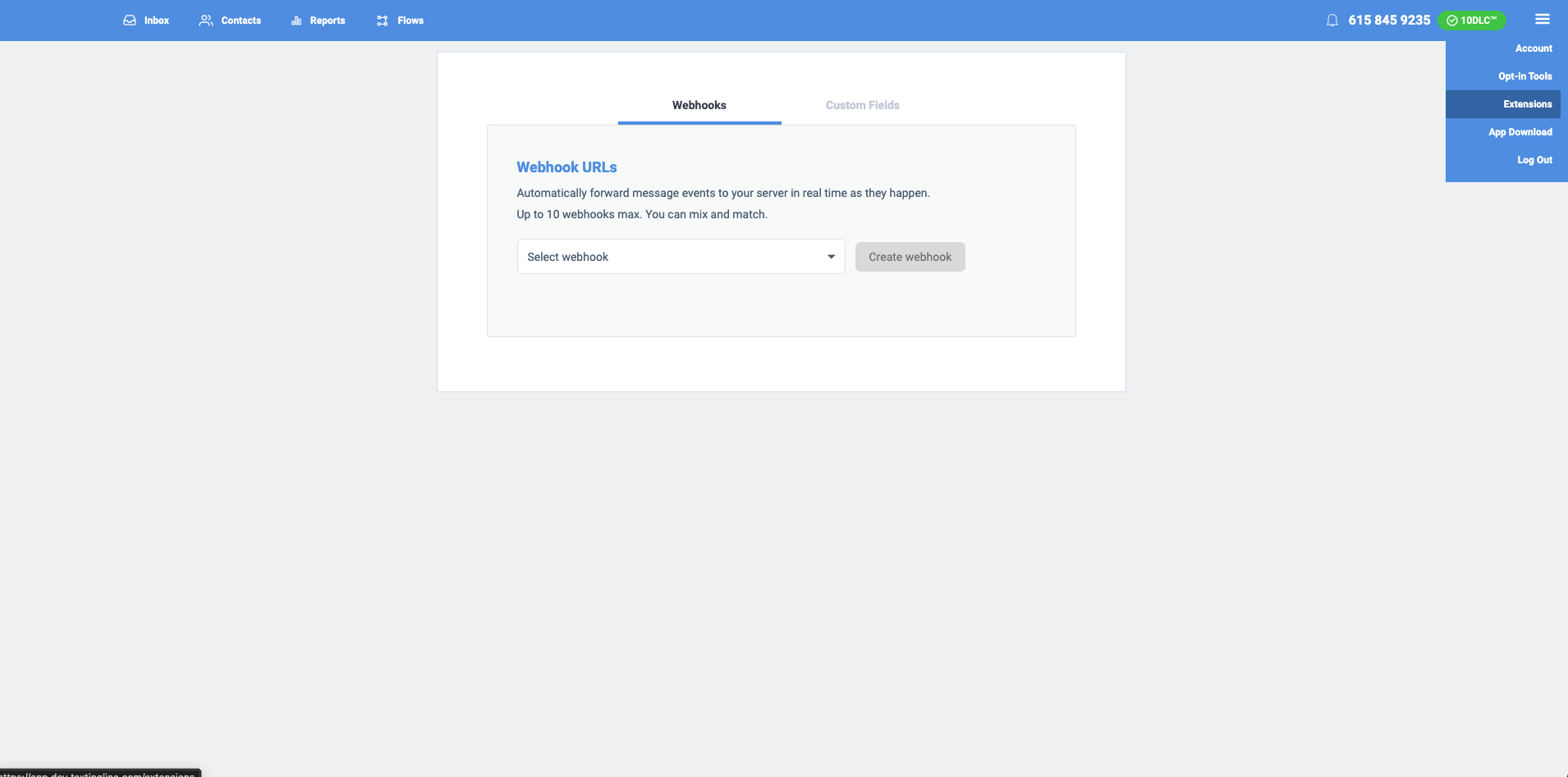
Webhooks are managed from the Extensions page in the Textingline dashboard. Each webhook is defined by an endpoint URL, the event types it should receive, and optional authentication credentials for your endpoint.
To create a webhook:
- Log in to the dashboard, open the hamburger menu in the top-right corner, and select Extensions
- Click Create webhook
- Enter your endpoint URL (must be HTTPS in production)
- Select the event types you want this webhook to receive — use wildcards like
messaging.*to subscribe to broader categories - (Optional) Configure authentication headers your endpoint requires (Basic, Bearer, API Key, or custom header)
- Save the webhook, then use Send test to confirm your endpoint responds correctly
Event types
Subscribe to specific event types or use wildcard patterns to receive broader categories of events.
Available events
| Event type | Description |
|---|---|
messaging.outgoing.message.queued | An outbound message has been queued for delivery |
messaging.outgoing.message.sent | An outbound message was sent to the carrier |
messaging.outgoing.message.failed | An outbound message failed to send |
messaging.outgoing.message.delivered | An outbound message was confirmed delivered to the recipient |
messaging.outgoing.message.undelivered | An outbound message could not be delivered to the recipient |
messaging.incoming.message.received | An inbound message was received from a recipient |
messaging.broadcast.initiated | A broadcast has been initiated and messages are being dispatched |
messaging.broadcast.completed | A broadcast has finished processing all messages successfully |
messaging.broadcast.failed | A broadcast has failed — all batches errored or no messages were sent |
tracking.link.clicked | A tracking link was clicked by a human visitor |
tracking.link.created | A new tracking link was created |
tracking.link.updated | A tracking link was updated |
tracking.link.deleted | A tracking link was deleted |
tracking.link.expired | A tracking link expired automatically |
contacts.group.opted_in | A contact opted in to one of your groups |
contacts.group.opted_out | A contact opted out of one of your groups |
Wildcard patterns
Use wildcard patterns to subscribe to multiple event types with a single entry:
| Pattern | Matches |
|---|---|
* | All event types |
messaging.* | All messaging events (outgoing, incoming, and broadcast) |
messaging.outgoing.* | All outgoing message events |
messaging.outgoing.message.* | All outgoing message status events |
messaging.incoming.* | All incoming message events |
messaging.incoming.message.* | All incoming message events |
messaging.broadcast.* | All broadcast lifecycle events |
tracking.* | All tracking events (link clicks and lifecycle) |
tracking.link.* | All tracking link events |
contacts.* | All contact events |
contacts.group.* | All contact group opt-in / opt-out events |
How webhook requests are sent
Every webhook delivery is an HTTP POST to your configured endpoint URL with Content-Type: application/json. The body is the JSON envelope described in Payload structure; routing and signing metadata travel in request headers.
Request headers
| Header | Description |
|---|---|
Content-Type | Always application/json. |
X-Webhook-Id | The webhook configuration ID (whk_...). Same value for every delivery to that webhook. |
X-Webhook-Event | The event type that triggered this delivery (e.g. messaging.outgoing.message.delivered). For forward compatibility, always read the per-event type from events[].eventType in the body rather than relying on this header. |
X-Webhook-Timestamp | ISO 8601 timestamp of when the delivery was sent. |
X-Sms-Factory-Signature | HMAC-SHA256 hex digest of the raw request body, signed with your API key secret. Present whenever signing is enabled on the webhook. See Signature verification. |
Additional headers may be present if you configured webhook-level authentication (Basic, Bearer, API Key, or custom header) when creating the webhook — those are the credentials you provided for us to send back to your endpoint, separate from the platform-issued signature above. Other transport headers (User-Agent, Accept, etc.) may also be set by the underlying HTTP client; don't depend on their exact values.
Treat the request shape as forward-evolving.
We may add new top-level fields to the JSON envelope, new fields to existing
events[].dataobjects, and new event types at any time without prior notice. We will never rename or remove a field, or change a field's type, without bumpingschemaVersionfirst — but additive changes do not bump the version.Your handler should:
- Parse the body as JSON and iterate
events[]— don't assume a single event per delivery.- Ignore fields and event types it doesn't recognize, rather than rejecting the request.
- Run signature verification against the raw request body bytes before JSON parsing, so adding new fields can't break verification. See Signature verification for the canonical Node.js and Python implementations — prefer those snippets to a hand-rolled HMAC.
Payload structure
Every webhook delivery sends a JSON payload with a consistent envelope format.
Envelope
{
  "schemaVersion": "v1",
  "webhookId": "whk_abc123",
  "events": [
    {
      "eventId": "evt_def456",
      "eventType": "messaging.outgoing.message.sent",
      "timestamp": "2026-03-17T12:00:00.000Z",
      "data": {
        "id": "msg_789xyz",
        "direction": "outbound",
        "from": "+15551234567",
        "to": "+15559876543",
        "status": "sent",
        "broadcastId": null,
        "sentAt": "2026-03-17T12:00:00.000Z"
      }
    }
  ]
}| Field | Type | Description |
|---|---|---|
schemaVersion | string | Payload format version (currently "v1") |
webhookId | string | The webhook configuration ID this delivery is for |
events | array | Array of event objects included in this delivery |
events[].eventId | string | Unique identifier for this event (prefixed with evt_) |
events[].eventType | string | The event type that triggered this delivery |
events[].timestamp | string | ISO 8601 timestamp of when the event occurred |
events[].data | object | Event-specific payload (see schemas below) |
webhookIdidentifies your webhook configuration — it is the same for every delivery to that webhook. UseeventIdas the unique identifier per event.
The
eventsarray contains a minimum of 1 event per delivery. Events may be batched into a single delivery, so always iterate the full array rather than reading only the first element.
The
schemaVersionfield indicates the payload format version. The schema will evolve over time — always check this field and parse the payload accordingly. Ignore unknown fields gracefully to ensure forward compatibility.
Outgoing message events
These fields are included in the data object for all outgoing message events (queued, sent, failed, delivered, undelivered).
Lifecycle
Outgoing messages move through a single lifecycle that spans two phases. The send phase (solid arrows) is driven by the platform — the message is persisted, then submitted to the carrier. The receipt phase (dashed arrows) is driven by the carrier's asynchronous delivery receipt for a previously sent message, which can arrive seconds to hours later depending on the carrier and destination network.
%%{init: {"flowchart": {"nodeSpacing": 40, "rankSpacing": 60}, "themeVariables": {"fontSize": "18px"}}}%%
flowchart TD
    accept([send accepted]) -->|messaging.outgoing.message.queued| queued([queued])
    queued -->|messaging.outgoing.message.sent| sent([sent])
    queued -->|messaging.outgoing.message.failed| failed[[failed]]:::err
    sent -.->|messaging.outgoing.message.delivered| delivered[[delivered]]:::ok
    sent -.->|messaging.outgoing.message.undelivered| undelivered[[undelivered]]:::err

    classDef ok fill:#1f8a4d,stroke:#0f5a30,stroke-width:2px,color:#fff
    classDef err fill:#c0392b,stroke:#7d1f17,stroke-width:2px,color:#fff
Legend
- Solid arrow — synchronous platform transition (fires within seconds of the API call).
- Dashed arrow — asynchronous carrier delivery receipt (can arrive seconds to hours later).
- Double border — terminal state; no further webhook events fire for that message.
Every status shown above fires a webhook event of the same name (e.g. status queued → messaging.outgoing.message.queued). Two carrier-side details worth knowing:
- Carrier
canceledis folded intoundelivered. There is no separatecanceledstatus in our webhook surface. - Only terminal carrier receipts produce a webhook. Intermediate receipts (e.g. interim "accepted by upstream") are dropped silently — your endpoint will see
deliveredorundelivered, never an in-between state.
Common fields
| Field | Type | Description |
|---|---|---|
id | string | Message ID (prefixed with msg_) |
direction | string | Always "outbound" for outgoing messages |
from | string | Sender phone number |
to | string | Recipient phone number |
status | string | Message status (see per-event details below) |
broadcastId | string | null | Broadcast ID (prefixed with brc_) if part of a broadcast, otherwise null |
Per-event fields
messaging.outgoing.message.queued
| Field | Type | Description |
|---|---|---|
status | string | "queued" |
createdAt | string | ISO 8601 timestamp of when the message was created |
messaging.outgoing.message.sent
| Field | Type | Description |
|---|---|---|
status | string | "sent" |
sentAt | string | ISO 8601 timestamp of when the message was sent to the carrier |
messaging.outgoing.message.delivered
| Field | Type | Description |
|---|---|---|
status | string | "delivered" |
deliveredAt | string | ISO 8601 timestamp of when delivery was confirmed |
messaging.outgoing.message.failed
| Field | Type | Description |
|---|---|---|
status | string | "failed" |
errorType | string | Error classification (e.g., opted_out, invalid_destination, provider_error) |
errorMessage | string | Human-readable error description |
createdAt | string | ISO 8601 timestamp of when the failure occurred |
messaging.outgoing.message.undelivered
| Field | Type | Description |
|---|---|---|
status | string | "undelivered" |
errorType | string | Error classification |
errorMessage | string | Human-readable error description |
failedAt | string | ISO 8601 timestamp of when the delivery failure was reported |
See Error Codes — Message error types for the full list of errorType values and their descriptions.
Incoming message events
Inbound messages have no state machine — each delivered SMS or MMS from a contact fires messaging.incoming.message.received exactly once. There are no follow-up status transitions.
%%{init: {"flowchart": {"nodeSpacing": 40, "rankSpacing": 60}, "themeVariables": {"fontSize": "18px"}}}%%
flowchart LR
    carrier([carrier delivers inbound message]) -->|messaging.incoming.message.received| received[[received]]:::info

    classDef info fill:#1a73e8,stroke:#0d4f9e,stroke-width:2px,color:#fff
messaging.incoming.message.received
| Field | Type | Description |
|---|---|---|
id | string | Message ID (prefixed with msg_) |
direction | string | Always "inbound" |
from | string | Sender phone number (the recipient who replied) |
to | string | Your phone number that received the message |
status | string | "received" |
body | string | undefined | Text content of the message (may be absent for media-only messages) |
mediaItems | array | null | Array of media attachments, or null if none |
mediaItems[].mediaUrl | string | URL of the media file |
mediaItems[].contentType | string | MIME type of the media (e.g., image/jpeg) |
receivedAt | string | ISO 8601 timestamp of when the message was received |
Broadcast events
Broadcast lifecycle is tracked independently from the per-recipient outgoing message events. A broadcast emits initiated once dispatch begins and exactly one terminal event (completed or failed) when processing finishes. Per-recipient message status events (queued, sent, delivered, etc.) fire in parallel on each recipient — see Outgoing message events.
%%{init: {"flowchart": {"nodeSpacing": 40, "rankSpacing": 60}, "themeVariables": {"fontSize": "18px"}}}%%
flowchart TD
    accept([broadcast or batch accepted]) -->|messaging.broadcast.initiated| initiated([initiated])
    initiated -->|messaging.broadcast.completed| completed[[completed]]:::ok
    initiated -->|messaging.broadcast.failed| failed[[failed]]:::err

    classDef ok fill:#1f8a4d,stroke:#0f5a30,stroke-width:2px,color:#fff
    classDef err fill:#c0392b,stroke:#7d1f17,stroke-width:2px,color:#fff
messaging.broadcast.initiated
Fired when a broadcast has been initiated and messages are being dispatched to carriers.
| Field | Type | Description |
|---|---|---|
id | string | Broadcast ID (prefixed with brc_) |
status | string | "initiated" |
from | string | Sender phone number |
totalRecipients | number | Total number of recipients in the broadcast |
createdAt | string | ISO 8601 timestamp of when the broadcast was created |
initiatedAt | string | ISO 8601 timestamp of when the broadcast was initiated |
messaging.broadcast.completed
Fired when a broadcast has finished processing all messages (at least one message was sent successfully).
| Field | Type | Description |
|---|---|---|
id | string | Broadcast ID (prefixed with brc_) |
status | string | "completed" |
from | string | Sender phone number |
totalRecipients | number | Total number of recipients in the broadcast |
totalSent | number | Number of messages successfully sent |
totalFailed | number | Number of messages that failed to send |
createdAt | string | ISO 8601 timestamp of when the broadcast was created |
completedAt | string | ISO 8601 timestamp of when the broadcast finished processing |
messaging.broadcast.failed
Fired when a broadcast has failed — either all batches errored or no messages were successfully sent.
| Field | Type | Description |
|---|---|---|
id | string | Broadcast ID (prefixed with brc_) |
status | string | "failed" |
from | string | Sender phone number |
totalRecipients | number | Total number of recipients in the broadcast |
totalSent | number | Number of messages successfully sent (always 0 for failed) |
totalFailed | number | Number of messages that failed to send |
errorMessage | string | Description of why the broadcast failed |
createdAt | string | ISO 8601 timestamp of when the broadcast was created |
failedAt | string | ISO 8601 timestamp of when the broadcast was marked as failed |
Tracking link events
Click event
tracking.link.clicked
Fired when a tracking link is clicked by a human visitor. Bot and link-preview clicks are filtered out automatically.
| Field | Type | Description |
|---|---|---|
id | string | Click ID (prefixed with clk_) |
trackingLinkId | string | Tracking link ID (prefixed with tlk_) |
url | string | The full tracking link URL |
redirectUrl | string | The destination URL the visitor was redirected to |
messageId | string | Message ID (prefixed with msg_) — present when the link is associated with a message |
broadcastId | string | Broadcast ID (prefixed with brc_) — present when the link is associated with a broadcast |
flowId | string | Flow ID (prefixed with fl_) — present when the link is associated with a flow |
clickedAt | string | ISO 8601 timestamp of when the click occurred |
ipAddress | string | null | IP address of the visitor |
Lifecycle events
tracking.link.created
Fired when a new tracking link is created.
| Field | Type | Description |
|---|---|---|
id | string | Tracking link ID (prefixed with tlk_) |
url | string | The full tracking link URL |
redirectUrl | string | The destination URL |
createdAt | string | ISO 8601 timestamp of when the tracking link was created |
tracking.link.updated
Fired when a tracking link is updated.
| Field | Type | Description |
|---|---|---|
id | string | Tracking link ID (prefixed with tlk_) |
url | string | The full tracking link URL |
redirectUrl | string | The destination URL (may have changed) |
updatedAt | string | ISO 8601 timestamp of when the tracking link was updated |
tracking.link.deleted
Fired when a tracking link is manually deleted.
| Field | Type | Description |
|---|---|---|
id | string | Tracking link ID (prefixed with tlk_) |
url | string | The full tracking link URL |
deletedAt | string | ISO 8601 timestamp of when the tracking link was deleted |
tracking.link.expired
Fired when a tracking link expires automatically based on its configured expiration time.
| Field | Type | Description |
|---|---|---|
id | string | Tracking link ID (prefixed with tlk_) |
url | string | The full tracking link URL |
expiredAt | string | ISO 8601 timestamp of when the tracking link expired |
Contact events
Fired when a contact opts in to or out of one of your groups (lists). Events are per group: if a contact opts out of every group at once (for example by replying STOP), you receive one contacts.group.opted_out event for each group they were in.
Both events carry the same fields, differing only in the timestamp of the transition (optedInAt vs optedOutAt). Profile fields (firstName, lastName, email, gender, dateOfBirth, address) are included only when set on the contact. customFields is always present — an object keyed by your custom-field labels (visible fields only), or {} when the contact has no visible custom-field values.
{
  "contactId": "con_ghi789rstNoP3K2bMwSx",
  "phoneNumber": "+15125550142",
  "groupId": "grp_8K2QyZv8s6PpQrSt4uVwX",
  "groupName": "VIP Customers",
  "firstName": "Jane",
  "lastName": "Doe",
  "email": "[email protected]",
  "gender": "FEMALE",
  "dateOfBirth": "1990-04-12",
  "address": { "postalCode": "78701", "country": "US" },
  "customFields": { "Favorite Color": "Blue", "Loyalty Tier": "Gold" },
  "optedInAt": "2026-03-17T12:00:00.000Z"
}
contacts.group.opted_in
contacts.group.opted_inFired when a contact becomes an active member of a group — via single opt-in, an operator adding them, or confirmation of a double opt-in.
| Field | Type | Description |
|---|---|---|
contactId | string | Contact ID (prefixed with con_) |
phoneNumber | string | Contact's phone number in E.164 format |
groupId | string | Group ID (prefixed with grp_) |
groupName | string | The group's name |
firstName | string | Contact's first name — present when set |
lastName | string | Contact's last name — present when set |
email | string | Contact's email — present when set |
gender | string | MALE, FEMALE, or OTHER — present when set |
dateOfBirth | string | Date of birth (YYYY-MM-DD) — present when set |
address | object | Address with any of street, city, state, postalCode, country — present when set |
customFields | object | Custom-field values keyed by label (visible fields only); {} when the contact has none |
optedInAt | string | ISO 8601 timestamp of when the contact opted in |
contacts.group.opted_out
contacts.group.opted_outFired when a contact is removed from a group — whether they opted out themselves (for example by replying STOP) or were removed by an operator.
| Field | Type | Description |
|---|---|---|
contactId | string | Contact ID (prefixed with con_) |
phoneNumber | string | Contact's phone number in E.164 format |
groupId | string | Group ID (prefixed with grp_) |
groupName | string | The group's name |
firstName | string | Contact's first name — present when set |
lastName | string | Contact's last name — present when set |
email | string | Contact's email — present when set |
gender | string | MALE, FEMALE, or OTHER — present when set |
dateOfBirth | string | Date of birth (YYYY-MM-DD) — present when set |
address | object | Address with any of street, city, state, postalCode, country — present when set |
customFields | object | Custom-field values keyed by label (visible fields only); {} when the contact has none |
optedOutAt | string | ISO 8601 timestamp of when the contact opted out |
Signature verification
Every webhook delivery is signed using HMAC-SHA256 with your API key secret. Verify the signature to confirm that the payload was sent by Textingline and has not been tampered with.
Signature header
| Header | Description |
|---|---|
X-Sms-Factory-Signature | HMAC-SHA256 hex digest of the raw request body, signed with your API key secret |
Additional headers
| Header | Description |
|---|---|
X-Webhook-Id | The webhook configuration ID |
X-Webhook-Event | The event type that triggered this delivery |
X-Webhook-Timestamp | ISO 8601 timestamp of when the delivery was sent |
Verification example (Node.js)
const crypto = require('crypto');

function verifyWebhookSignature(rawBody, signature, apiKeySecret) {
  const expected = crypto
    .createHmac('sha256', apiKeySecret)
    .update(rawBody)
    .digest('hex');

  return crypto.timingSafeEqual(Buffer.from(signature), Buffer.from(expected));
}

// In your webhook handler:
app.post('/webhooks', (req, res) => {
  const signature = req.headers['x-sms-factory-signature'];
  const isValid = verifyWebhookSignature(
    req.rawBody,
    signature,
    API_KEY_SECRET,
  );

  if (!isValid) {
    return res.status(401).send('Invalid signature');
  }

  // Process the events
  const { events } = req.body;
  for (const event of events) {
    console.log(`Received ${event.eventType}:`, event.data);
  }

  res.status(200).send('OK');
});
Verification example (Python)
import hmac
import hashlib

def verify_webhook_signature(raw_body: bytes, signature: str, api_key_secret: str) -> bool:
    expected = hmac.new(
        api_key_secret.encode('utf-8'),
        raw_body,
        hashlib.sha256
    ).hexdigest()

    return hmac.compare_digest(signature, expected)

# In your webhook handler (Flask example):
@app.route('/webhooks', methods=['POST'])
def handle_webhook():
    signature = request.headers.get('X-Sms-Factory-Signature')
    is_valid = verify_webhook_signature(request.data, signature, API_KEY_SECRET)

    if not is_valid:
        return 'Invalid signature', 401

    payload = request.get_json()
    for event in payload['events']:
        print(f"Received {event['eventType']}: {event['data']}")

    return 'OK', 200
Delivery and retries
Success criteria
A delivery is considered successful when your endpoint returns any 2xx HTTP status code within 30 seconds. Any other response, or a timeout, is treated as a failure.
Delivery guarantees
Webhook delivery is at-least-once. We would rather send an event twice than not send it at all, so under some conditions — a retry, a network interruption, or a delivery that succeeded but could not be confirmed — the same event can be delivered more than once.
Your endpoint must be idempotent. Every event carries a stable eventId, and the same event always carries the same eventId across every delivery attempt. Record the ones you have processed and ignore repeats.
A single delivery may also contain more than one event, so always iterate the full events array rather than reading only the first element.
Which failures are retried
Not every failure is retried. A response that tells us the request itself was rejected will be rejected the same way on every subsequent attempt, so we stop rather than resending it for hours.
| Your response | Retried? |
|---|---|
5xx (any server error) | Yes |
429 Too Many Requests | Yes |
| Timeouts and connection failures | Yes |
Any other 4xx | No |
Why this mattersIf your endpoint returns
401because a credential expired, or404because the URL moved, the event is not retried — fix the webhook configuration and future events will deliver normally. Every non-retried failure is still recorded in your delivery logs with the status code we received, so nothing disappears silently.
If your response includes a Retry-After header, we honour it: the next attempt is scheduled at the time you asked for, rather than at the standard backoff interval below. Both header formats are supported — a number of seconds, or an HTTP date. Values longer than our maximum retry interval are capped to it, so asking for a very long delay will not extend the total retry window.
Retry schedule
Failed deliveries are retried with increasing backoff intervals:
| Attempt | Delay after failure |
|---|---|
| 1 (initial) | Immediate |
| 2 | 5 minutes |
| 3 | 10 minutes |
| 4 | 1 hour |
| 5 | 6 hours |
- Max retries is configurable per webhook (1–5 attempts, default: 5)
- Each retry uses the same payload and signature as the original delivery
- If a webhook configuration is disabled or deleted, pending retries are automatically canceled
When we stop trying
Once the configured attempts are used up, the event is not delivered and is not retried again. It is recorded in your delivery logs with the final status and the response we received, so you can always see which events were never delivered and why.
Events are also not retried when your endpoint returns a response we treat as a definitive rejection — see Which failures are retried above. Those are recorded in your delivery logs the same way.
If you need to reconcile, query your delivery logs for failed deliveries rather than assuming every event eventually arrives.
Source IP addresses
All webhook deliveries originate from the following IP addresses. If your endpoint is behind a firewall, add these CIDRs to your allowlist:
| CIDR |
|---|
104.154.30.130/32 |
34.45.101.118/32 |
Rate limiting
Webhook deliveries are rate-limited to 150 deliveries per minute per endpoint URL. If the rate limit is exceeded, deliveries are automatically rescheduled after a short delay. Rate-limited deliveries do not count as failed attempts, so they do not consume your retry budget and do not contribute to automatic disabling.
An endpoint that stays over its limit continuously will eventually have the deliveries waiting on it abandoned, recorded in your delivery logs as rate-limited. This only happens when an endpoint is sent far more events than it accepts, for a sustained period.
Automatic disabling
If your webhook endpoint is consistently unreachable, the platform will automatically disable it to prevent wasting resources on repeated failures.
How it works
If all delivery attempts (including retries) for an event fail, the platform records when continuous failures began. If 3 days pass without a single successful delivery, the webhook is automatically disabled.
Any single successful delivery resets the failure tracking, so intermittent failures will not trigger auto-disable.
When a webhook is auto-disabled, it is turned off and all pending retries are canceled. You will see a message explaining why it was disabled.
Re-enabling a disabled webhook
To re-enable a webhook that was auto-disabled:
- Fix the issue with your endpoint (ensure it is reachable and returns
2xxresponses) - Use the Send test button to verify your endpoint is healthy
- Toggle the webhook back on in the dashboard
Re-enabling a webhook resets all failure tracking, giving it a clean slate.
Delivery logs
Delivery logs are coming soon. You will be able to query delivery history, filter by status, event type, and date range to debug and monitor your webhook integrations.
Testing your webhooks
Send a test event
Use the Send test button in the Textingline dashboard to verify your endpoint is reachable and responding correctly. The test sends a sample event to your configured URL and displays the result — including the full error message if delivery fails. This is the fastest way to confirm your endpoint is working before going live.
To send a test event:
- Go to Webhooks in the dashboard
- Select the webhook you want to test
- Click Send test
- Review the result — a successful test returns a
2xxresponse from your endpoint, while a failed test shows the error details (e.g., connection refused, timeout, non-2xx status code)
The test event uses the same signing mechanism as real deliveries, so it also validates that your signature verification logic is working correctly.
Local development with ngrok
During development, your local server isn't reachable from the internet. Use ngrok to create a secure tunnel to your local machine.
- Install ngrok
# macOS
brew install ngrok

# Or download from https://ngrok.com/download-
Start your local webhook server on a port (e.g.,
3000) -
Start ngrok to create a public URL pointing to your local server
ngrok http 3000-
Copy the forwarding URL from the ngrok output (e.g.,
https://a1b2c3d4.ngrok-free.app) -
Configure your webhook in the dashboard using the ngrok URL as the endpoint (e.g.,
https://a1b2c3d4.ngrok-free.app/webhooks) -
Send a test event using the Send test button, or trigger a real event (e.g., send a message) to see the webhook delivery arrive at your local server
ngrok URLs change each time you restart ngrok (on the free plan). Remember to update your webhook endpoint URL in the dashboard when the URL changes.
Best practices
- Return 200 quickly. Acknowledge the webhook immediately and process the event asynchronously. Long-running processing in the request handler may cause timeouts and unnecessary retries.
- Verify signatures in production. Always validate the
X-Sms-Factory-Signatureheader to ensure the payload is authentic and has not been modified in transit. - Handle duplicates idempotently. Delivery is at-least-once, so you should expect to receive the same event more than once and must deduplicate on your end using the
eventIdfield. See Delivery guarantees. - Use HTTPS endpoints. Always use HTTPS URLs for your webhook endpoints to ensure payloads are encrypted in transit.
- Monitor your endpoint. If your endpoint is consistently failing, deliveries will be retried up to the configured maximum. Check your server logs and ensure your endpoint is healthy.
- Do not rely on event ordering. Events may arrive out of order, especially when retries are involved. Use the
timestampfield inside each event to determine the actual sequence of events rather than the order in which they are received. - Monitor for auto-disabled webhooks. Check the
disabledReasonanddisabledAtfields in your webhook responses to detect endpoints that have been automatically disabled due to persistent failures. - Account limits. Each account can have up to 10 active webhooks.
Updated 8 days ago